🚀 Don't lose the AI tools that matter ever again

Save AI tools you find with 1-click.
Never lose them again.

AIDock is the personal vault for AI consultants — Save every AI tool you use, organise into categories and find them easily. Share your curated AI stack and discover what others are using.

See Features ↓
My AI Dock
ClaudeFreemium
Midjourney
Zapier AIFree
ChatGPTFreemium
Codex
Figma AIFree
Notion AIFreemium
Copilot
PerplexityFreemium
Runway
ClaudeFreemium
Midjourney
Zapier AIFree
ChatGPTFreemium
Codex
Figma AIFree
Notion AIFreemium
Copilot
PerplexityFreemium
Runway

Currently in beta

My View Social
📁 All Tools 10
💻 Coding 1
🎬 Video 1
⚙️ Workflow 3
🎨 Design 1
🆓 Free Tier
12 / 20 tools
Good Evening, User 👋
12Tools
6Categories
6Free
1Paid
ChatGPT Freemium
Zapier AI Freemium
OpenClaw Freemium
Make Freemium
The Problem & Solution

The old way is broken.
AIDock is here to fix it.

😩

Before AIDock

  • 100s of AI tools launched everyday — impossible to keep track
  • Saved everywhere, findable nowhere — scattered across bookmarks, notes, tweets
  • Re-googling the same tools for specific tasks, every single time
🚀

After AIDock

  • See a tool on YouTube → 1 click → saved, categorized, done
  • Your Dashboard: all your tools in one beautiful, searchable place
  • Client asks "best AI outbound tools?" → Check your curated stack in seconds
How it works

From discovery to community.
In four simple steps.

AIDock transforms how you save, organize, and share AI tools. Here's the journey.

01

One-click save

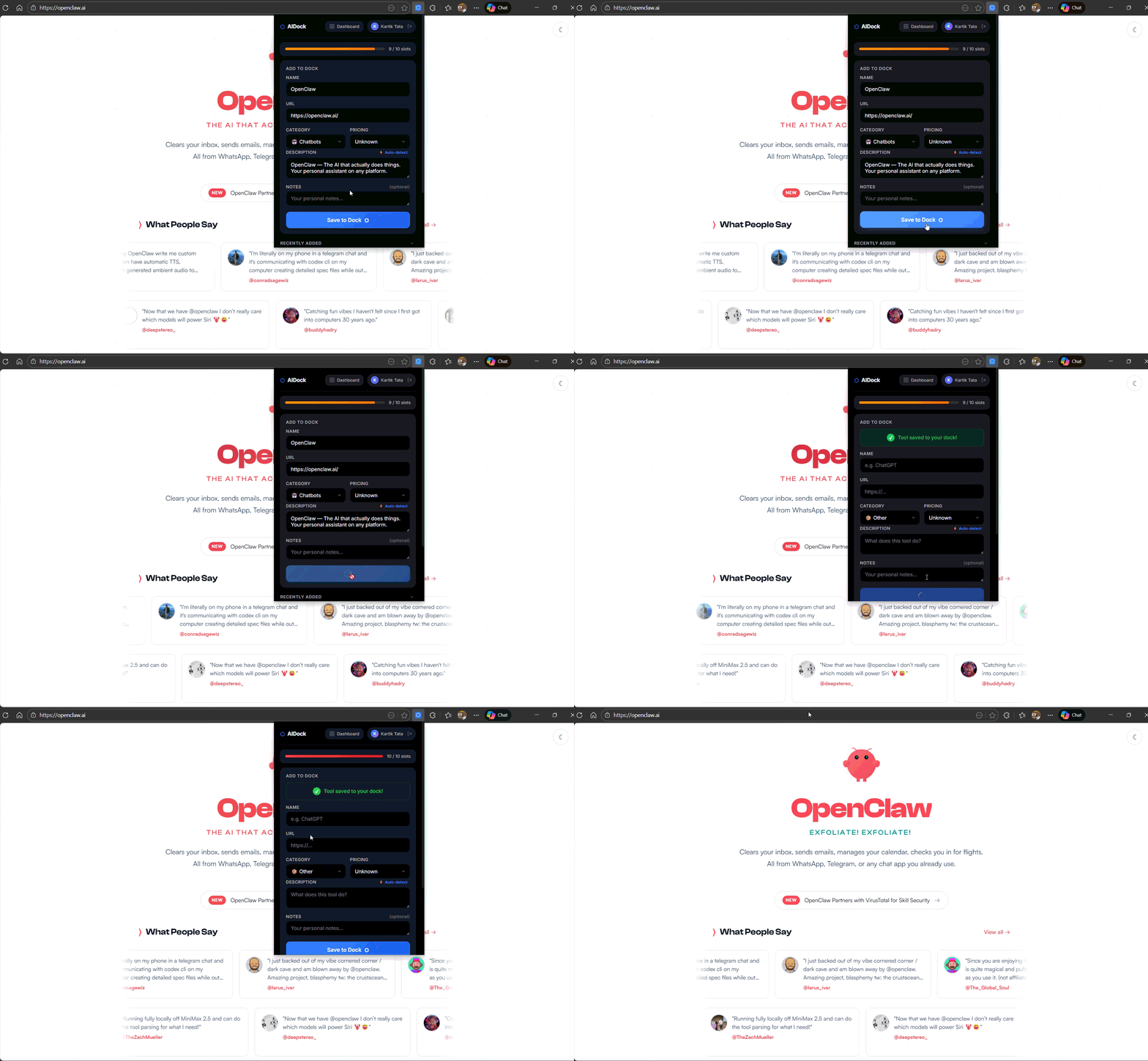
Found an amazing AI tool? Our Chrome extension lets you save it instantly. One click captures the name, URL, description, and category — no copy-pasting required.

Auto-detects tool info from any webpage
Chrome extension one-click save
02

Your personal dashboard

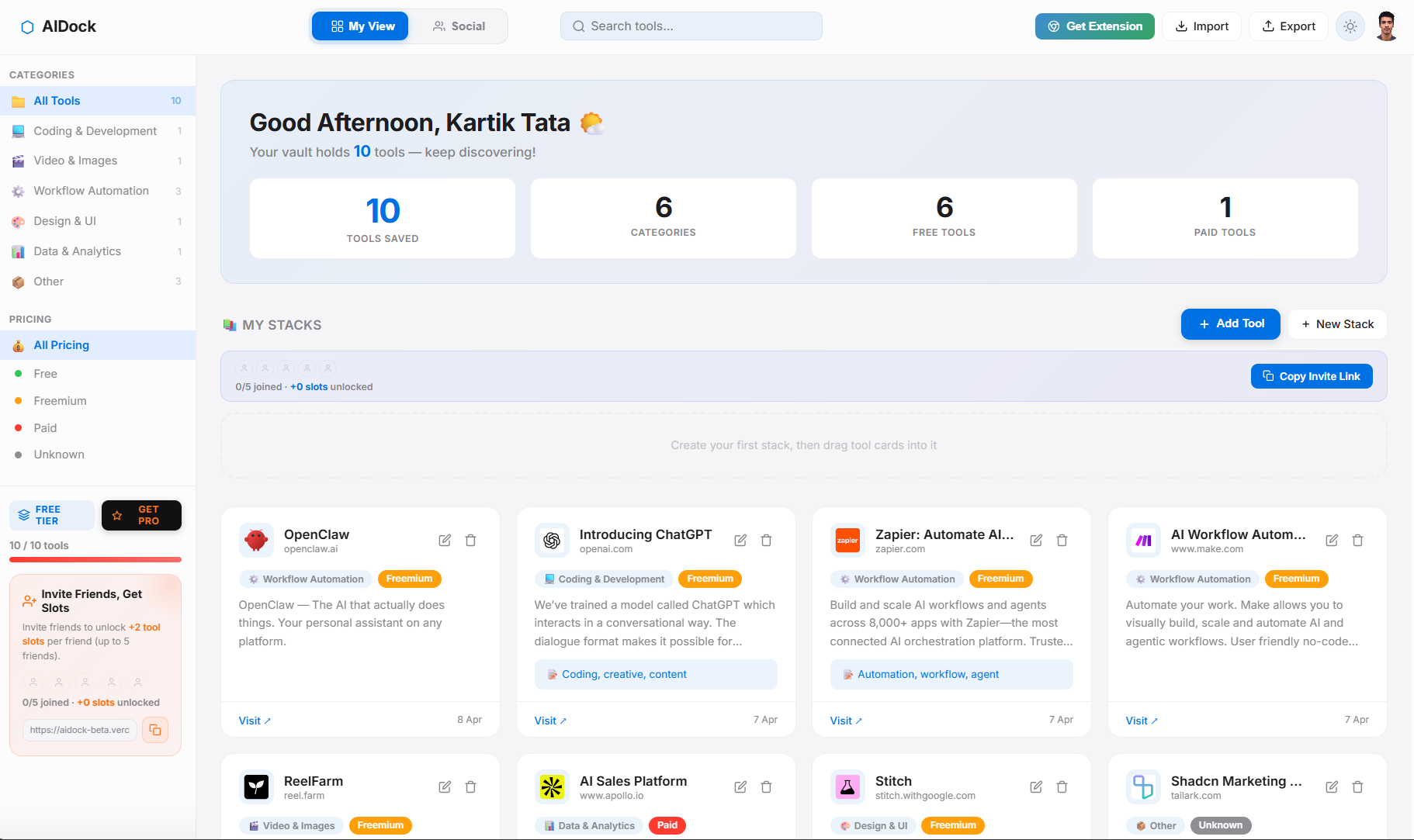
Every tool you save appears in your beautifully organized dashboard. Filter by category, search instantly, and never lose track of that tool you found last month.

🎯 Smart categories & instant search
Personal AI tools dashboard
03

Share as stacks

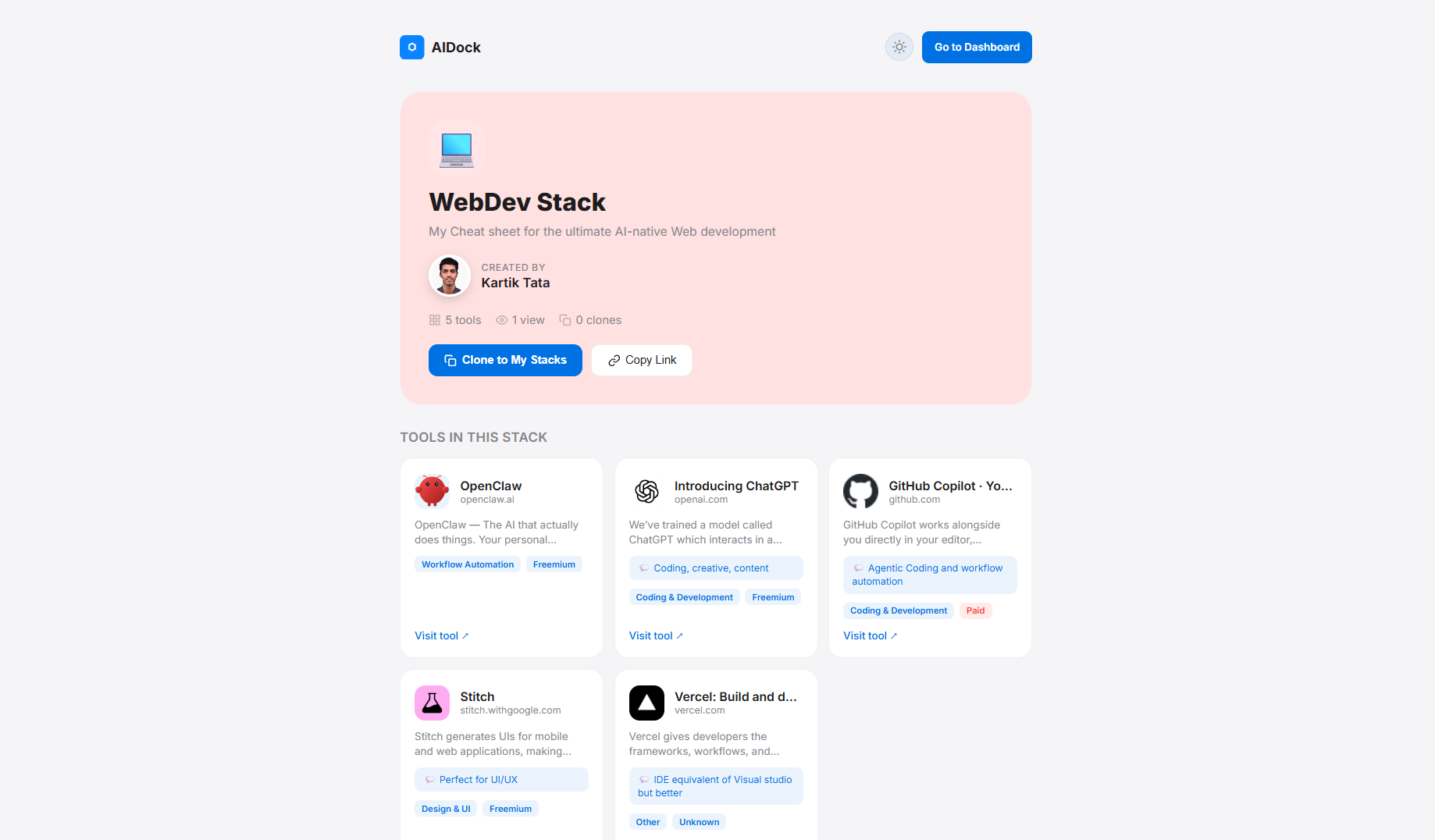
Curate your favorite tools into themed collections called Stacks. Share your "WebDev Stack" or "Content Creation Stack" with teammates, friends, or the entire community.

📦 One link shares your entire toolkit
Share AI tools as stacks
04

Follow & discover

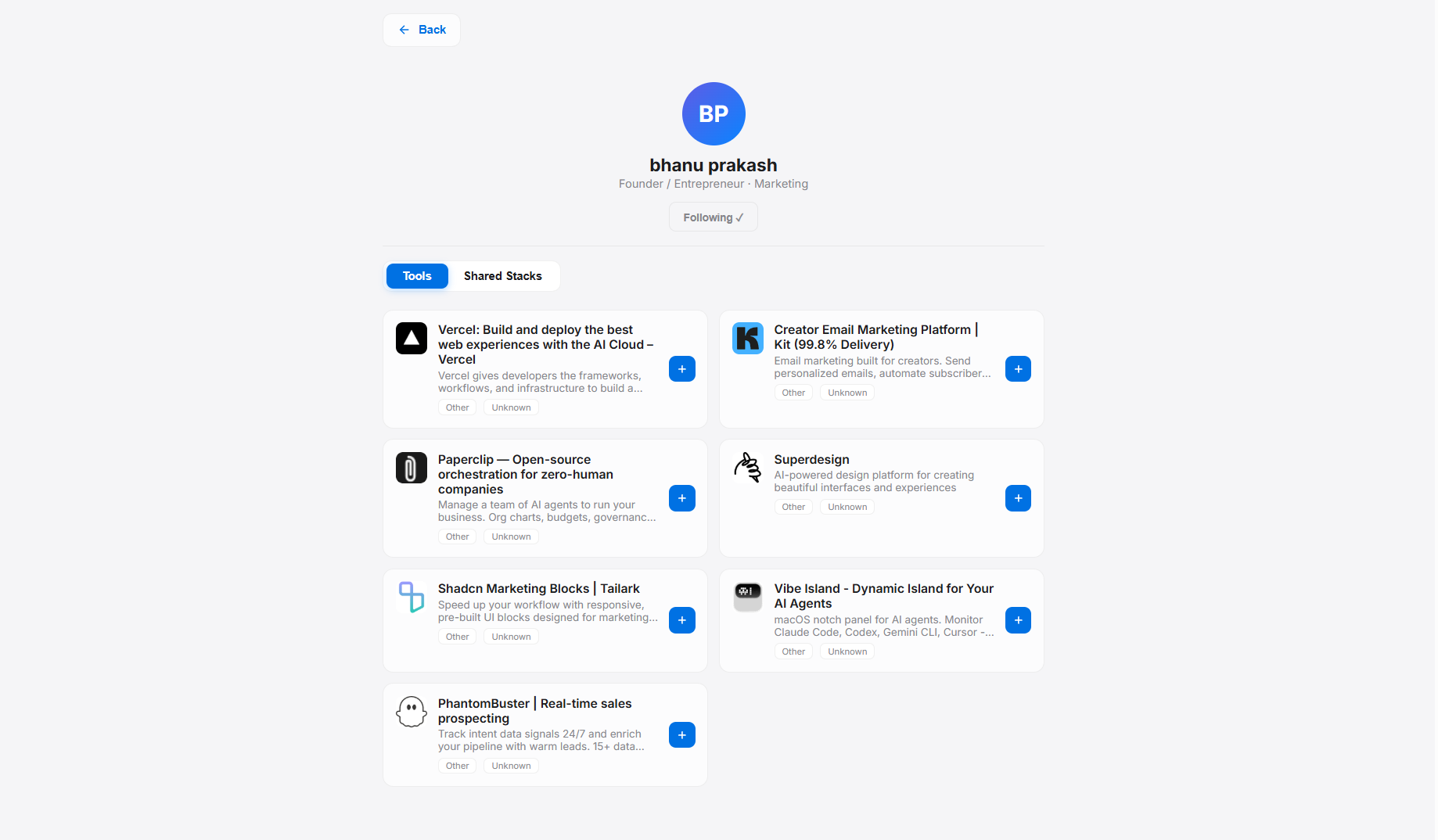
Follow creators, developers, and teams to see what tools they're using. Discover hidden gems from the community and stay ahead of the AI curve.

🌐 Learn from the community's best
Follow users and discover tools

Stay organised. Never miss a tool.

New AI tools launch every day. Without a system, you forget what you found and miss what others discovered. AIDock fixes that.

Chrome Extension

Chrome Extension

Save any AI tool instantly with our Chrome extension. Just one click while browsing — no copy-pasting URLs or switching tabs.

🏠

Your Personal AI Dashboard

One place for every AI tool you use or want to try. Categorised, searchable, and always at your fingertips. No more scattered bookmarks or forgotten tabs.

🤝

Share Your Stack

Built an incredible AI toolkit? Share your curated stack with friends, teammates, or the whole community. Let others benefit from your discoveries.

🌍

Discover What Others Use

Browse stacks shared by the community. See what tools top creators, developers and teams rely on — and expand your own knowledgebase.

🗂

Smart Categories & Filters

Coding, Audio, Video, Writing, Automation — organise by use case, pricing, or both. Find any tool in seconds.

🔍

Auto-detect Descriptions

Paste a URL and AIDock fetches the description automatically. Add your own notes for personal context.

Testimonials

Your vault. Your edge.
Here's what others say.

"Finally, a place to organize all the AI tools I discover. I used to have 50+ bookmarks scattered everywhere — now everything's in one searchable dashboard."
SK
Sarah K.
Content Creator
"I follow other consultants and discover tools I'd never find on my own. It's like having a curated feed of the best AI tools from people who actually use them."
JL
Jessica L.
AI Consultant

Simple, transparent pricing

Start free. Upgrade when you need unlimited power.

Free
$0 forever
Perfect for getting started
  • 20 tool slots
  • 3 shareable stacks
  • Invite friends for +2 slots each
  • Chrome extension
  • Social discovery
Get Started Free
🎉 Early-bird Pricing
Pro Monthly
$7.99$4.99/month
For serious AI power users
  • Unlimited tool slots
  • Unlimited shareable stacks
  • Priority auto-detect descriptions
  • Custom stack themes & branding
  • Advanced analytics
  • Early access to new features
Get Pro Monthly
Best Value
🎉 Early-bird Pricing
Pro Yearly
$59.99$39.99/year
Save 33% — only $3.33/month
  • Unlimited tool slots
  • Unlimited shareable stacks
  • Priority auto-detect descriptions
  • Custom stack themes & branding
  • Advanced analytics
  • Early access to new features
Get Pro Yearly

You save $20 compared to monthly

The right AI tool, recalled in seconds.
Not 20 minutes of searching.

Save your tools. Share your stack. Discover what the community is using.

Start Building Your Dock
FAQ

Questions? We've got answers.

Why should I use the Chrome extension instead of adding tools manually?

The Chrome extension saves you time by auto-detecting the tool's name, description, and even suggesting a category — all with one click. No more switching tabs, copy-pasting URLs, or typing descriptions. Just click "Save to Dock" while you're on the tool's website.

Why can't I see anything on the Social feed yet?

AIDock is a new community! The Social feed shows tools from people you follow. Start by inviting friends with your referral link or search for users by email to follow. As the community grows, you'll discover more tools shared by others.

Is my data private? Can others see my saved tools?

By default, all your saved tools are private — only you can see them. Tools only become visible to others when you add them to a Stack and share that Stack publicly. You're always in control of what you share.

How do I get more tool slots on the Free tier?

Free accounts start with 20 tool slots. Invite friends using your referral link and earn +2 slots for each friend who joins (up to 5 friends = +10 bonus slots). Want unlimited? Upgrade to Pro for just $4.99/month (early-bird pricing).

What's the difference between Tools and Stacks?

Tools are individual AI products you save to your dashboard (like ChatGPT, Midjourney, etc.). Stacks are curated collections of tools grouped by theme — like "My Content Creation Stack" or "Developer Essentials." Stacks are perfect for sharing your toolkit with others.

Can I use AIDock on multiple devices?

Yes! AIDock is web-based, so your dashboard syncs across all your devices. Just log in from any browser. The Chrome extension works on any desktop Chrome browser where you install it.

Get AIDock Chrome Extension

Save AI tools directly from any website with one click

1
Download the extension

Click the button below to download the extension files

Download Extension (.zip)
2
Unzip the file

Extract the downloaded zip file to a folder on your computer

3
Open Chrome Extensions

Go to chrome://extensions in your browser

4
Enable Developer Mode

Toggle "Developer mode" ON in the top-right corner

5
Load the extension

Click "Load unpacked" and select the unzipped extension folder